
What a QR Menu Can’t Do — And Why That’s Fine
A digital display menu and a full QR order-and-pay system look identical at the moment of scanning, but they do not solve the same problem. Learn what a display-mode menu deliberately doesn’t do — payments, kitchen tickets, replacing your servers — and why that restraint suits most European table-service venues.
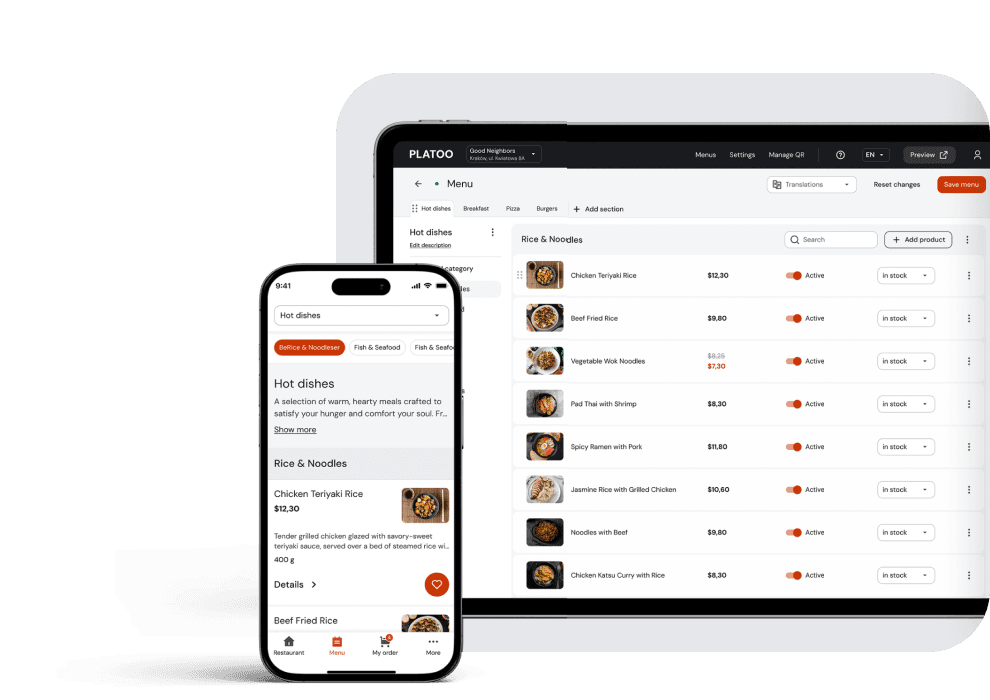
Walk into almost any restaurant in a European tourist district today and the ritual is the same: sit down, find the small laminated square glued to the tabletop, point your phone camera at it, and wait for the menu to load. For most guests this has become as unremarkable as being handed a paper menu by a waiter was ten years ago. But behind that simple scan sits a real strategic question that restaurant owners have only recently begun asking themselves in earnest: what is this technology actually supposed to do?
The answer matters more than it first appears. Two very different categories of product have quietly merged in the public mind under a single abbreviation — QR. The first category is the digital display menu: a visual, scannable catalogue of dishes, prices, photos and allergen information that replaces a paper or laminated menu. The second is a full ordering and payment system, where the same scan lets a guest build a cart, send the order straight to the kitchen, and settle the bill without a server ever getting involved. At the moment of scanning, the two look identical. But they are not the same product, they do not solve the same problem, and — this is the part vendor marketing most often leaves out — one of them is not right for every restaurant.
This article is about the line between those two approaches: what a display-mode menu deliberately doesn’t do, and why, for a large share of European hospitality venues, that is restraint rather than a shortcoming.
The confusion isn’t accidental. Vendors selling full ordering-and-payment platforms have every interest in framing anything short of complete automation as an unfinished product. The job of a digital display menu is to answer a narrower, more concrete question: what exactly does this venue sell, what does it look like, and is it safe to eat? Everything beyond that — building a cart, routing tickets to the kitchen, taking payment — belongs to an entirely different technical tier, one that many venues, especially those built around table service, have solid operational reasons to keep at arm’s length.
The Misconception: Does Your Restaurant Really Need Order-and-Pay at the Table?
Every restaurant owner considering “going digital” runs into the same pitch sooner or later: a full POS ordering platform that promises to eliminate paper, speed up service and let guests order and pay right from the table. The pitch is attractive because it bundles several unrelated problems — menu presentation, order management and payment processing — into a single purchasing decision. But these are three separate operational layers, and conflating them leads owners to buy considerably more than their venue actually needs.
Visual Display Versus Operational Complexity
The core job of a digital display menu is presentation: showing dishes clearly, with accurate prices, legible allergen markers and photography. A full ordering and payment system adds an entirely different layer on top — cart logic, kitchen ticket routing, bill splitting, tipping prompts, refund workflows and reconciliation against the POS ledger. Each of those layers requires configuration, staff training and ongoing technical maintenance. None of them is needed to solve the original problem: “our paper menus look dated and reprinting them is expensive.”
This is exactly where a standalone QR display catalogue and a full POS-integrated table ordering system diverge operationally. Adding a full ordering system to the POS increases the number of moving parts restaurant staff have to manage — hardware, software updates, retraining, and support tickets when something breaks mid-shift — compared with a simple catalogue that only needs to render correctly on a phone screen. For a small or mid-sized restaurant that complexity isn’t free; it’s a recurring operational cost, often carried by managers already stretched thin by the staff shortages and rising labour costs that characterise the hospitality sector across Europe.
Why Full Ordering Isn’t Always Right for Casual and Fine Dining
Full self-service systems make the most sense in high-volume, low-friction formats: fast-casual chains, food courts, stadium concessions — settings where speed genuinely does matter more than service. In table-service restaurants, from casual to fine dining, the calculation is the opposite. Guests in these venues are, to some extent, paying for attention — for the server who knows the wine list, remembers a dietary note from a previous visit, or reads the right moment to fire the second course. Removing the human from the ordering chain isn’t just a workflow change; it changes what the meal is.
That doesn’t mean these restaurants should avoid digital menus altogether. It means the digital layer should support the service model already in place rather than replace it. A guest browsing dish photos and an allergen filter on their phone while waiting for the server isn’t a workaround — it’s arguably a better version of what the paper menu was always trying to do.
There’s another dimension to this decision that most procurement conversations underweight: staffing. European hospitality venues have genuinely struggled with recruitment over the past few years — Eurostat put the job vacancy rate for accommodation and food service activities at 3.2% in the euro area and 3.0% across the EU in Q1 2026, among the highest of any sector — and every new system a restaurant introduces has to be learned, maintained and troubleshot by a team that is frequently already short-handed during peak hours. A full ordering platform adds a training load for every new hire; a display-mode menu, by contrast, requires almost no staff training at all, because the guest interacts with it directly and the server’s role doesn’t change. For a manager deciding where to spend limited onboarding time this season, that difference is far from secondary.
Comparison: QR Display Menu vs. Full QR Order-and-Pay System
| Criterion | Digital display menu | Full QR order-and-pay system |
|---|---|---|
| Core function | Presenting dishes, prices, allergens | End-to-end order capture and payment |
| Implementation complexity | Minimal — a hosted web catalogue | Higher — POS integration, staff training |
| Payment processing | None | Mandatory, with transaction fees |
| Server’s role | Unchanged; the menu supports upselling | Reduced; the guest serves themselves |
| Best suited to | Casual and fine dining, service-led venues | Fast-casual, food courts, high-volume outlets |
| Ongoing maintenance | Updating dish data in an admin panel | Maintaining POS, payment gateway and hardware sync |
Functional Boundary #1: It Doesn’t Process Payments (And Saves You Thousands in Fees)
The absence of a built-in checkout is usually presented in vendor comparisons as a “gap” — something the product hasn’t got around to yet. That framing deserves scrutiny. For a significant share of restaurants, declining to process payments through the menu is a deliberate and financially sound boundary, not an oversight.
Avoiding Payment Gateway Fees
Every payment processed through an integrated ordering system — by card, Apple Pay or Google Pay — carries a transaction fee, typically a percentage of the order value plus a fixed component per transaction. On the thin margins typical of hospitality, those percentages add up meaningfully across a shift, a month, a year. The flat subscription model of a display-mode menu catalogue sidesteps the problem entirely: the restaurant pays a predictable monthly or annual amount regardless of how much revenue passes through the dining room, because the menu takes no part in the transaction at all.
- Flat subscription model: a predictable monthly cost, independent of revenue volume.
- Per-transaction model: a percentage fee on every card or mobile wallet payment.
- Compounding effect: transaction fees grow with sales; subscription costs don’t.
For a high-traffic venue in peak tourist season this is not a marginal difference. A restaurant processing thousands of euros in card payments through an integrated gateway every evening hands back a percentage of that volume in fees, night after night, indefinitely. A subscription-based visual menu has no such leak.
Preserving the Traditional Server-Led Payment Experience
There’s another angle here. Across much of European dining culture, the moment the server brings the bill — sometimes with a brief exchange about the meal — is part of the ritual of closing out a visit. Moving that moment onto a phone screen changes the emotional shape of the end of the meal, for better or worse depending on the format. For hospitality-led venues, keeping payment in human hands preserves a moment guests — particularly in fine dining and destination venues — generally expect.
A digital menu doesn’t have to process a single euro to justify its deployment — it only has to look good, load fast, and tell the guest what’s actually in the dish.
Functional Boundary #2: It Doesn’t Replace Your Staff (It Makes Them Better Salespeople)
The conversation around staff shortages in Europe has become urgent enough that any technology promising headcount reduction automatically gets attention. But there is a meaningful difference between technology that removes the need for service staff and technology that supports the staff a restaurant already has — and marketers frequently present the two as if they were the same thing.
Streamlining Order-Taking Without Sacrificing Hospitality
A display-mode menu removes one bottleneck: the guest no longer has to wait for a server simply to see what’s available, ask a price, or check whether a dish contains nuts. That kind of streamlining can measurably improve table turnover, since guests spend less time idle, waiting for a paper menu or a server’s attention before they’re ready to order. But removing that single point of friction is not the same as removing the server from the transaction itself. The guest still tells a person what they want; that person still recommends the wine, notices the empty water glass, recognises a regular’s usual order before it’s asked for.
Illustrative example
A couple sits down at a seaside restaurant at the height of tourist season. While waiting for the server, they scan the code on the table and browse the menu — checking the shellfish allergy marker on one dish and looking at photos of two others. By the time the server arrives, they’ve narrowed it down to two options and have a single clarifying question about portion size. The server, noticing which dish photo drew the most attention, suggests a wine to go with it. The order is taken within ninety seconds of the server approaching — not because a machine took it, but because the guest arrived at the conversation already informed.
Dish Photography as the Server’s Best Upselling Tool
Visual dish photography does real work here. Quality photographs of the venue’s actual dishes — not stock images — give servers a natural opening to draw a guest’s attention to higher-margin dishes, seasonal specials or add-ons, because the guest has already seen what those dishes look like before the server says a word. Case studies circulated by digital menu vendors cite claimed conversion uplifts in the 20–30% range after adding quality photography to a menu; that figure has not been independently audited at industry scale and should be treated as an indicative estimate rather than a guaranteed outcome — but the underlying mechanism (“people are more likely to order what they can already picture”) is well established in menu psychology and the hospitality service literature.
App-led self-service flow
Guest scans → builds their own cart → sends the order to the kitchen → pays in the app → no human interaction until the food arrives.
QR-supported hospitality flow
Guest scans → browses photos and allergen data → server approaches already aware of the guest’s visible interest → server recommends and upsells → the order is taken in person → payment happens at the table, as always.
The second flow eliminates no function of any role. It changes what the server is doing in the few minutes before the order — from reciting the menu from memory to reading preferences the guest has already formed and building on them.
What a Digital QR Menu MUST Do: Flawless EU Compliance
Whatever position a restaurant takes on ordering and payment, one requirement is not optional. Any venue operating in the European Union is required to comply with Regulation (EU) No 1169/2011, which governs the provision of food information to consumers and sets mandatory disclosure rules in force across all 27 EU member states. A digital menu that gets this wrong isn’t merely a weak product — it’s a source of risk for the restaurant using it.
Complying With Regulation (EU) No 1169/2011 (Mandatory Allergen Disclosure)
The regulation requires food businesses to disclose the presence of any of the 14 major allergens recognised in EU law (Annex II) — cereals containing gluten, crustaceans, eggs, fish, peanuts, soybeans, milk, tree nuts, celery, mustard, sesame, sulphur dioxide and sulphites, lupin and molluscs — for every dish on the menu, whether the food is prepacked or served in the restaurant. The obligation applies regardless of format: paper menus, laminated table cards and digital menus fall under it equally.
Where a digital menu genuinely proves its value is in how that information is presented, not in the fact that it exists. A well-built allergen filter lets a guest with a specific restriction — a shellfish allergy, gluten intolerance — narrow the entire menu down to what they can safely order, instead of manually scanning a dense grid of icons dish by dish. That is a markedly better experience than a paper menu can offer, and it’s achieved without any heavier POS infrastructure. A display-mode catalogue can store and surface this data just as reliably as a full ordering platform, because allergen disclosure is a data and presentation problem, not a transactional one.
Automatic Multilingual Translation for European Tourist Traffic
Compliance and guest experience intersect again on the question of language. Restaurants in European tourist destinations routinely serve guests who don’t read the local language fluently enough, which turns a fixed print run of paper menus into a real barrier — both to sales and, more seriously, to the guest correctly understanding which allergens a dish contains. Automatic multilingual translation built into a digital menu solves this without the restaurant maintaining a separate printed menu for every language. It also closes a gap that’s easy to miss: a guest who can’t read the allergen disclosure in their own language has not, in any meaningful sense, received that information — even if the text is formally present on the page.
The Technical Foundation: Static QR Codes and Real-Time Updates
The physical QR sticker on the restaurant table looks like the simplest part of this whole system. It’s also the part most likely to cause real operational headaches if the underlying architecture is built wrong.
Beyond the PDF: Why a Responsive Mobile Interface Wins
A significant share of the “digital menus” in use today turn out, on closer inspection, to be nothing more than a PDF of the printed menu uploaded behind a link. It’s a shortcut, and guests notice. A PDF laid out for an A4 printed page doesn’t adapt to a phone screen — it forces the guest to pinch, zoom and scroll sideways to read a single line of text, which is precisely the friction the digital menu was meant to eliminate. On top of that, such a file can’t be filtered by allergen, can’t be searched, doesn’t translate automatically, and has to be replaced in full every time a single price changes.
A properly built responsive mobile menu, by contrast, is designed as a web page that adjusts automatically to the guest’s screen, loads quickly even on mobile data, and supports the filtering, translation and real-time updates described above. The difference between “we have a QR code” and “we have a digital menu” often comes down to exactly this: whether the code hides a scannable document or a genuine responsive interface.
One additional benefit is worth mentioning for restaurants investing in this kind of solution: a well-structured digital menu, correctly indexed, also improves how a venue’s dishes and opening hours appear when a prospective guest searches for it online — particularly via Google Business Profile, which can pull structured menu data directly into the menu section of a listing rather than sending users off to a separate PDF download. The same applies to Local Business and Restaurant markup on the venue’s own site, which a real HTML menu supports and a PDF does not.
Frequently Asked Questions
A QR menu catalogue lets guests browse dishes, photos, descriptions and allergen information on their smartphone by scanning a code at the table. A QR ordering system goes further, allowing guests to send orders straight to the kitchen and pay online. Catalogues focus on presentation and hospitality; ordering systems automate the transaction itself.
No. A display-mode digital QR menu works as an independent web catalogue and requires no integration with a POS or kitchen display system (KDS). That independence is exactly what makes deployment simple — there is no software sync to maintain, and most restaurants can go live across their tables within a single day.
Yes, provided the platform explicitly states all 14 major mandatory allergens — including gluten, crustaceans, tree nuts, dairy and the others recognised by the regulation — for every dish, and makes that information easily accessible to guests before they order rather than burying it in a footnote.
A PDF menu forces guests to pinch, zoom and scroll horizontally on small screens. It typically loads more slowly on mobile data, can’t be filtered by allergen, doesn’t translate automatically, and requires a complete re-upload of the file every time a single price or dish changes.
No, provided it’s used as an optional visual tool rather than a replacement for service. Used that way, it lets guests preview plating and check allergen information at their own pace, while all recommendations and the order itself remain with the service team — which is exactly where guests in most fine dining formats expect them to be.
The Boundary Is the Point
None of the above is an argument against digital menus, or against the QR code as a piece of restaurant infrastructure. It’s an argument for choosing the right technical tier for the format a restaurant actually operates in. A digital display menu that shows accurate prices, real photography, clear allergen data and instant multilingual translation solves the problems paper and laminated menus genuinely can’t handle: reprint costs, illegibility, language barriers and compliance risk. It does so without touching payment processing, without displacing the server’s role at the table, and without adding a layer of POS complexity that most table-service restaurants neither need nor asked for.
The restaurants getting the most value from this technology right now aren’t the ones chasing full automation. They’re the ones treating the QR code the way a good menu was always supposed to work — as a tool that informs the guest and supports the person serving them, rather than trying to replace either.
That distinction is likely to matter more as the underlying regulatory and technical environment shifts. Allergen disclosure rules under EU 1169/2011 are not static — enforcement has tightened in several member states over the past few years, and tourist destinations in particular are facing increased scrutiny of menus that disclose information vaguely. A digital menu that can be updated centrally is better positioned to keep pace with regulatory change than a laminated card revisited only when the print budget allows. The same applies to pricing: when ingredient costs fluctuate, a restaurant relying on printed menus either absorbs the cost of frequent reprints or leaves outdated prices on the table — neither of which serves the guest or the business. A digital menu updated centrally the moment a supplier invoice changes removes that trade-off entirely.
None of this asks a restaurant to give up anything about the way it currently serves guests. It asks only that it choose software that does one thing excellently — presenting the menu accurately, legibly and lawfully — instead of software that attempts five things and handles the most important of them merely adequately.
Sources: EU Regulation No 1169/2011 — Food Information to Consumers · European Commission — Food Allergens · Eurostat — Job Vacancy Rate, Q1 2026 · European Commission — Employment and Social Developments in Europe 2023 · Google Search Central — Local Business Structured Data · Google Actions Center — Structured Menu Data · International Journal of Hospitality Management — Do Pictures Help?